gCanvas
| Definition: |
include xpGUI.e
gdx id = gCanvas([rtn redraw=NULL,] string attributes="", dword_seq args={}) |
||||||||||||||||||||||||||||||||||||||||||||||||||||||||||||||||
| Description: |
Creates an interface element that is a canvas - a working area for your application.
redraw: a procedure invoked whenever the canvas needs to be redrawn, see REDRAW below. For more information on the attributes and args parameters see gSetAttributes(). This is a paranormalised function. (see technicalia) Returns the identifier of the created element. A gCanvas is also used to implement gGraph, gList, and gTable. |
||||||||||||||||||||||||||||||||||||||||||||||||||||||||||||||||
| pwa/p2js: | Supported. | ||||||||||||||||||||||||||||||||||||||||||||||||||||||||||||||||
| See Also: | gGraph, gImage, gImage_from_XPM, gImageDraw, gList, gTable, gRedraw | ||||||||||||||||||||||||||||||||||||||||||||||||||||||||||||||||
| Example: |
-- demo\xpGUI\gCanvas.exw (simplified)
include xpGUI.e

procedure redraw(gdx canvas, integer w, h)
    gCanvasLine(canvas,0,h/2,w,h/2,-1,1,XPG_GREEN)
--  ... more gCanvasLine/Arc/Text/Polygon/Circle
--      plus one gImageDraw(gImage_from_XPM())
end procedure

gdx canvas = gCanvas(redraw),
    dialog = gDialog(canvas,`gCanvas`,`SIZE=240x163`)
gSetAttribute(canvas,"BGCLR",XPG_PARCHMENT)
gShow(dialog)
gMainLoop()

Other examples include demo\xpGUI\GraphR.exw, aaline.exw, and scroller.exw |
||||||||||||||||||||||||||||||||||||||||||||||||||||||||||||||||
| Colours: |
The following constants are defined for convenience.
Note that for instance while yellow is a primary color, in the RGB/additive color model (as used by xpGUI) it is made by combining red and green, in other words quite unlike mixing blue and yellow paint to make green paint (since paints are/use the RYB/subtractive colour model), and in fact mixing blue and yellow in the RGB model end ups with white! The WinAPI backend actually uses BGR colour encodings, but xpGUI quietly maps to/from RGB automatically, a fact you may need to know when porting some (legacy) Windows-based code to xpGUI. Colour codes are often declared as atom, however integer is also fine except under 32-bit when the alpha channel is #40..#BF, which it probably only very rarely ever would be. All the standard colours are fully opaque, ie have an alpha channel of #00 (which may get flipped to/from #FF on some backends). string res = gGetColourName(atom colour) returns one of the (leftmost) names above, "#RRGGBB", or "-1". atom colour = rgba(atom red, green, blue, alpha=0) Values should be 0..255 (fractions discarded). An alpha of 0 is fully opaque, 255 is fully transparent. integer {red,green,blue,alpha} = to_rgba(atom colour) For example, to_rgba(XPG_YELLOW) yields {255,255,0,0}, ie red+green [as it is in the RGB model]. atom colour = hsv_to_rgba(atom h, s, v, a=0) h,s,v: hue (0..<360), saturation (0..1), value (0..1). For more info see https://en.wikipedia.org/wiki/HSL_and_HSV a: An alpha of 0.0 is fully opaque, 1.0 fully transparent. |
||||||||||||||||||||||||||||||||||||||||||||||||||||||||||||||||
| Functions: |
The following routines should only be used inside its REDRAW handler.
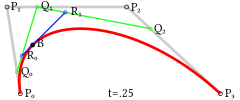
Use gRedraw() to force a repaint. Non-1 style/width/colour transiently set LINESTYLE/LINEWIDTH/FGCLR, which can also be set as defaults for several subsequent calls, or overriden on each (in small font below, just to keep lines short). Note that pixels are 0-indexed, so on a 200x200 canvas valid co-ordinates are {0,0} to {199,199}, with any attempts to draw off-canvas pixels simply quietly ignored, and say a line from {50,50} to {-300,27000} just drawing the bit it can. All co-ordinates are in pixels, with fractions permitted, but simply ignored/truncated. gCanvasLine(gdx canvas, atom x1, y1, x2, y2, integer style=-1, width=-1, atom colour=-1) Draw a line from {x1,y1} to {x2,y2} (inclusive, zero-based). gCanvasArc(gdx canvas, atom xc, yc, w, h, angle1, angle2, integer flags=0, style=-1, width=-1, colour=-1) gCanvasCircle(gdx canvas, atom xc, yc, radius, bool filled=false, integer style=-1, width=-1, colour=-1) Co-ordinates are in pixels, angles in degrees, flags can be XPG_FILLED with XPG_CHORD or XPG_SECTOR. The angles define the arc start and end, but they are not the angle relative to the center, except for w==h aka a circle. The arc starts at the point (xc+(w/2)*cos(angle1), yc+(h/2)*sin(angle1)) and ditto ends/angle2 (always clockwise). A complete ellipse can be drawn using 0 and 360 as the angles. gCanvasCircle just invokes gCanvasArc(w=h=2*radius,0,360). If angle2 is less than angle1 it will be increased by 360 until it is greater than angle1. True(/false) can also be used in place of XPG_FILLED, and the latter passed to gCanvasCircle. Note that filled arcs (and cirles/chords/sectors) (currently) have bresenham edges under WinAPI (fixable, see technicalia). See the initial screenshot above (there’s a bUsePoly fudge in that for "", which achieves roughly what I plan to make it do automatically, one day). gCanvasCubicBezier(gdx canvas, atom x1, y1, xc1, yc1, xc2, yc2, x2, y2, colour=-1) gCanvasQuadBezier(gdx canvas, atom x1, y1, cx, cy, x2, y2, colour=-1) NB: additional parameters not yet finalised, migration from aaline.exw to xpGUI.e still outstanding Draws a curve from x1,y1 to x2,y2 using control points xc1,yc1 and xc2,yc2. The (simpler) quadratic version just invokes the cubic one using the same control point twice. gCanvasPolygon(gdx canvas, sequence poly, bool bFilled=true, integer colour=-1, style=-1, width=-1) poly: a list of vertices aka starting points of each segment to be drawn. If a segment is just {x,y} a straight line is drawn to the end point (ie next/first segment). If a segment is length 4 aka {x,y,cx,cy} a quadratic bezier is drawn, likewise length 6 a cubic bezier. The poly can also contain {} which makes it a multi-part polygon, such as a metal washer, polo mint or doughnut. An error occurs for any part containing less than three vertices, or any segment not length 0|2|4|6. Polygon filling occurs on the full collection of segments, rather than each individually. A filled polygon may not have a style other than XPG_CONTINUOUS or width other than 1. bFilled/colour/style/width: assumed to be self-explanatory. see|run demo/xpGUI/gCanvasPolygon.exw and/or PhixLogo.exw for some examples. sequence poly = gRotatePolygon(sequence poly, object angle) poly: as gCanvasPolygon above but less restrictive, so (eg) you can rotate a single point. angle: rotate all the points of poly. If angle is an atom, rotation occurs about poly[1][1..2], otherwise it must be a three-atom {angle,cx,cy} triplet with rotation about {cx,cy}. The angle should be specified in degrees, clockwise, usually but does not have to be 0..+/-360. [Be warned this seems significantly slower than anticipated, possibly only managing ~150 points per second, whereas I would have confidently predicted it was going to be 10 or even 100 times faster than that...] gCanvasRect(gdx canvas, atom xmin, xmax, ymin, ymax, bool bFill=false, integer rc=0, style=-1, width=-1, atom colour=-1) Draws a rectangle, optionally filled and/or with rounded corners. xmin/xmax/ymin/ymax: includive, so {0,0,0,0} draws a single pixel top-left. rc: 0 for square corners, else the radius of the a quadrant/arc to use. Unpredictable results when > w/2 or h/2. bFill/style/width/colour: assumed to be self-explanatory. Replaces cdCanvas[Rounded](Box|Rect)() of pGUI. gCanvasPixel(gdx canvas, atom x, y, colour=-1) Draws a single pixel in a specified colour or the current foreground colour if omitted or -1. (It is expected to be more common that a colour is provided on every call than using the latter defaulting.) gCanvasText(gdx canvas, atom x, y, string text, integer align=XPG_E, object angle=0, colour=-1, integer style=-1) Draws text, with full UTF-8 support, optionally realigned, rotated, and/or coloured. align: replaces cdCanvasSetTextAlignment() of pGUI (transiently): 
The longhand aliases XPG_NORTH, XPG_SOUTH, XPG_WEST, XPG_EAST (the default) can also be used, along with XPG_NORTHWEST, XPG_NORTHEAST, XPG_SOUTHWEST, XPG_SOUTHEAST, and XPG_CENTRE. (Technically XPG_CENTER is the wrong constant, but explicitly/deliberately treated as XPG_CENTRE here.) You might also imagine the red centre of XPG_C being shifted to one of the eight surrounding orange crosses. Should the text end up too close to {x,y} you are expected to explicitly adjust {x,y} to mimic a margin, and further it is fairly likely that certain fonts and/or backends may have subtly different requirements. string res = gGetAlignName(integer align) converts an alignnent to a human readable string. angle: in degrees, clockwise, replaces cdCanvasSetTextOrientation() of pGUI (transiently). Rotation normally occurs around the top left (XPG_NW) corner of wherever the text ended up. The rotation point may be overidden by specifying the angle as eg {XPG_SE,90}. Note rotation points are relative to text, and the logical inverse of align (aka txt->pt vs. pt->txt) [Arguably align is at fault, but north putting it below would just be completely counter-intuitive.] There are a full 81 combinations of align and rotation point for any given angle, which should suffice! Fairly obviously, (eg) align:=XPG_NE and angle:={XPG_SW,90} actually results in the text being XPG_SE of {x,y}, and likewise, the same align:=XPG_NE but angle:={XPG_SW,270} actually results in the text being XPG_NW of {x,y}. You may prefer to use the following diagram to select a rotation point (XPG_C is its own logical inverse, no others are.): 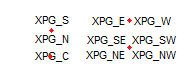 colour: as usual, an atom other than -1 transiently sets FGCLR(), should colour be a {fore,back} pair such as {XPG_RED,XPG_BLUE} (note unlike other functions it is object not atom), then while WinAPI/DrawText copes, under GTK it does a gCanvasRect() or if angle!=0 a rotated gCanvasPolygon() first. style: may be XPG_NORMAL, XPG_BOLD, XPG_ITALIC, or XPG_BOLDITALIC. A transient set FONT occurs. Note that underline and strikeout are not supported (by most/all backends), you’d’ve to gCanvasLine() it. You may also use gGetTextExtent(), but applying any rotation/align to the results from that is down to you. |
||||||||||||||||||||||||||||||||||||||||||||||||||||||||||||||||
| Attributes: | |||||||||||||||||||||||||||||||||||||||||||||||||||||||||||||||||
| ? EXPAND |
(non inheritable): The default value is "YES". The natural size is the size of 1 character.
Note that an explicit SIZE on the gCanvas(/gGraph) itself or whatever container it expands into is strongly recommended. Said parent container may itself may be inheriting from or expanding into the size of its parent, and of course should any MAXSIZE or MINSIZE be in use, any (initial) size should not exceed those limits. Only the width is critical on a (non-expanding) gList, whereas a gTable has column widths in the column data itself, and the height of both can be deduced from the number of rows, unless that needs to be virtual (as next). |
||||||||||||||||||||||||||||||||||||||||||||||||||||||||||||||||
| SCROLLSIZE |
Specify or retrieve some (larger) virtual canvas of which the real canvas should show some (smaller) VIEWPORT.
Were you to (eg) accidentally open a video file in xpEditer, and that treated it as a text file of 500K lines, some of which were
500K characters long, it might try (and fail) to create a 236TB canvas, of which at most 16MB (0.000006%) would ever be shown,
and obviously even if something significantly smaller did actually work it could quite literally be millions of times slower than needed.
The file demo/xpGUI/scroller.exw allows (after editing) the creation of a 138TB virtual canvas that only actually uses 1.05MB or 0.000001%.
Such extreme cases probably aren’t of themselves all that useful, but not crashing (the whole machine), not hogging memory, and not
running ridiculously slowly, probably are.
If not set then (the [variable/non-constant] attribute) SIZE is used instead. It is whether SCROLLSIZE is larger than VIEWPORT (which also defaults from SIZE) that determines the presence or absence of scrollbars. Automatically handled on gList (see ROWS) and gTable (see the rows parameter). This setting is entirely independent of MAXSIZE and MINSIZE, and should you (for instance) want to centre a smaller SCROLLSIZE within a larger SIZE that is entirely the responsibility of the REDRAW handler, ditto honoring VIEWPORT. See demo/xpGUI/scroller.exw for an example (and be amazed at how trivial and easy all this actually is). Returns {w,h} with as just mentioned either being zero (their defaults) resorting to SIZE. |
||||||||||||||||||||||||||||||||||||||||||||||||||||||||||||||||
|
SCROLLPORT, VIEWPORT |
Retrieve or specify which part of a larger virtual SCROLLSIZE should be shown on the actual canvas. SCROLLPORT and VIEWPORT and just aliases of each other and refer to exactly the same thing. Automatically handled on gList and gTable. Returns {x,y,w,h} where x,y are initially 0 and indicate the [virtual] pixel position of the top left corner of the canvas, and w,h are from SIZE, reduced to account for any visible scrollbars, with {0,0,w,h} being returned if SCROLLSIZE is not set, or it is smaller than the SIZE, but in the latter case not necessarily strictly enforced. The scrollbars are drawn as/when needed after the REDRAW handler returns, and that should of course draw the (virtual) contents determined by x,y in the (actual) rectangle defined by 0..w-1 and 0..h-1, with any attempts to draw pixels outside of that area being, as usual, simply quietly ignored (or, to be excessively pedantic, duly soon obliterated by a scrollbar). When setting this attribute, only the origin (first two elements) should be provided. Negative values are not permitted, however they can exceed the natural limits that using the scrollbars would normally attain, so that for instance a gList can "go to line" and show only a few lines, with "dead space" filling up the rest of the visible/actual canvas. Setting this attribute automatically updates the otherwise private scrollbars. Any and all handling of the latter is achieved via the VIEWPORT attribute. Settings that result in the entire visible area being "dead space" and/or off-canvas scrollbar thumbs are not specifically guarded against, consider yourself warned. |
||||||||||||||||||||||||||||||||||||||||||||||||||||||||||||||||
| LINESTYLE |
Default: XPG_CONTINUOUS(==1), valid styles are:
Note that values other than XPG_CONTINUOUS with a line width other than 1 may appear as rhomboids, and perhaps for that same reason native WinAPI/GTK do not support such, but while that effect may be less than ideal it is reasonably acceptable on slightly thicker lines, and fine on horizontal/vertical lines, and just seems churlish to remove it completely. The style may also be a sequence (of 1/0, see xpGUI.e) which sets XPG_CUSTOM_DASH(==6). (XPG_CUSTOM_DASH is currently set at the system level rather than per canvas, for no good reason, shout should that sting.) returns 1..5 but pattern not XPG_CUSTOM_DASH. Use string res = gGetLineStyleName(object style) to convert a style to a human readable string. |
||||||||||||||||||||||||||||||||||||||||||||||||||||||||||||||||
| LINEWIDTH |
As above, values other than 1 may cause line styles other than XPG_CONTINUOUS to appear as rhomboids. Default: 1. Implemented in JavaScript via ctx.lineWidth |
||||||||||||||||||||||||||||||||||||||||||||||||||||||||||||||||
| also |
? ACTIVE,
? BGCLR,
? FGCLR,
? CANFOCUS,
FONT,
MINSIZE,
MAXSIZE,
SIZE,
TIP,
? VISIBLE. |
||||||||||||||||||||||||||||||||||||||||||||||||||||||||||||||||
| Handlers: |
|
||||||||||||||||||||||||||||||||||||||||||||||||||||||||||||||||
| REDRAW |
A procedure that should be invoked when the canvas needs to be redrawn, and should retrieve/honour any VIEWPORT. (Obviously it is not necessary to fetch the VIEWPORT if no SCROLLSIZE was ever set.) procedure redraw(gdx canvas[,integer w, h]) canvas: identifier of the canvas element that needs drawing. w,h: (optional) equivalent to integer {w,h} = gGetAttribute(canvas,"SIZE") as the first line of a single-arg procedure.
Usually specified on the initial gCanvas() call, but can also be set or replaced later as usual, ie gSetHandler(canvas,"REDRAW",redraw), however a fatal error occurs should the redraw routine (still) be NULL when the canvas is displayed. Note the background colour used for initially clearing the canvas should be set before the first paint event and is applied before redraw() is invoked, and automatically restored after (so you don’t have to). Any decision to change that initial clear setting should likewise therefore be made and performed outside of the redraw() routine. |
||||||||||||||||||||||||||||||||||||||||||||||||||||||||||||||||
| IDROP |
(optional) Intercept/override the drawing operations.
function idrop(integer rid) rid: an xpGUI drawing operation such as gCanvasText, full list below. Returns: the original (rid) or your intercept version of that. When you write an intercept, you must replicate the exact signature, usually by copying from these help docs, including any defaults, as say iCanvasText(), which can then invoke the real gCanvasText(), if desired. Only useful on the canvas-derived controls gGraph, gList, and gTable, which have overidden the REDRAW handler. Allows an application to tweak/log the drawing primitives, for an example see demo\xpGUI\gTable.exw The current set of so-interceptable drawing operations is: gCanvasRect, gCanvasLine, gCanvasText. (the only one used by gList) More may be added as/when/if needed (search xpGUI.e for "IDROP", or better yet xpg_default_IDROP, to be sure). Note changes to the attributes BGCLR, are not intercepted and may need -1s replaced with gGetAttribute(), at least when logging for later use as opposed to minor/immediate tweaking. |
||||||||||||||||||||||||||||||||||||||||||||||||||||||||||||||||
| also |
CLICK,
MOUSEMOVE,
KEY: All common handlers are supported. |