cdCanvasBox
| Definition: |
include pGUI.e
cdCanvasBox(cdCanvas canvas, atom xmin, xmax, ymin, ymax) -- or -- wdCanvasBox(cdCanvas canvas, atom xmin, xmax, ymin, ymax) |
| Description: |
Fills a rectangle according to the current interior style. All points in the interval xmin<=x<=xmax, ymin<=y<=ymax will be painted. When the interior style CD_HOLLOW is defined, the function behaves like its equivalent cdRect. When translating to Phix, the C function cdfCanvasBox() should simply have the 'f' deleted. |
| pwa/p2js: | Supported. However see the notes for cdCanvasBegin(). Replaced by gCanvasRect in xpGUI. |
| Attributes: |
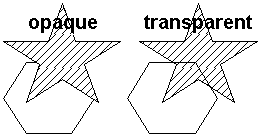
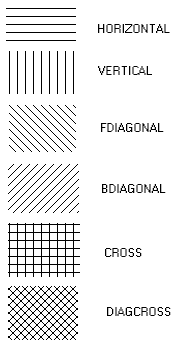
These also apply to cdCanvasSector/Chord. Aside: Inserting "Set"/"Get" into the C function names might be tedious, but then again so would prefixing with "{} =". cdCanvasSetBackOpacity(cdCanvas canvas, integer opacity) -- or -- integer opacity = cdCanvasGetBackOpacity(cdCanvas canvas) Configures the background opacity to filling primitives based on the foreground and background colors. Note that backopacity is only used when InteriorStyle is CD_HATCH or CD_STIPPLE. Values: CD_TRANSPARENT or CD_OPAQUE. Default value: CD_TRANSPARENT. When translating C code, cdCanvasBackOpacity() needs Set/Get inserted, and for the latter CD_QUERY removed. If it is opaque the primitive will erase whatever is in the background with the background color. If it is transparent, only the foreground color is painted. In some drivers is always opaque. Back Opacity Attribute cdCanvasSetFillMode(cdCanvas canvas, integer mode) -- or -- integer mode = cdCanvasGetFillMode(cdCanvas canvas) Configures or retrieves a predefined polygon fill rule (CD_EVENODD or CD_WINDING). Default value: CD_EVENODD. When translating C code, cdCanvasFillMode() needs Set/Get inserted, and for the latter CD_QUERY removed. Fill Modes cdCanvasSetInteriorStyle(cdCanvas canvas, integer style) -- or -- integer style = cdCanvasGetInteriorStyle(cdCanvas canvas) Configures or retrieves the current style for the area filling primitives: CD_SOLID, CD_HOLLOW, CD_HATCH, CD_STIPPLE or CD_PATTERN. Note that only CD_HATCH and CD_STIPPLE are affected by the backopacity. Default value: CD_SOLID. When translating C code, cdCanvasInteriorStyle() needs Set/Get inserted, and for the latter CD_QUERY removed. If a stipple or a pattern were not defined, when they are selected the state of the attribute is not changed. When the style CD_HOLLOW is defined, functions cdCanvasBox() and cdCanvasSector() behave as their equivalent cdCanvasRect() and cdCanvasArc()+cdCanvasLine()s, and the polygons with style CD_FILL behave like CD_CLOSED_LINES. cdCanvasSetHatch(cdCanvas canvas, integer style) -- or -- integer style = cdCanvasGetHatch(cdCanvas canvas) Configures or retrieves a predefined hatch style (CD_HORIZONTAL, CD_VERTICAL, CD_FDIAGONAL, CD_BDIAGONAL, CD_CROSS or CD_DIAGCROSS) and sets the interior style to CD_HATCH. The lines are drawn with the foreground color, and the background is drawn with the background color if back opacity is opaque. Default value: CD_HORIZONTAL. When translating C code, cdCanvasHatch() needs Set/Get inserted, and for the latter CD_QUERY removed. The foreground and background colors must be set before setting the style. In some drivers is always opaque. Fill Modes cdCanvasSetStipple(cdCanvas canvas, atom width, height, atom_string stipple) Defines a wxh matrix of zeros (0) and ones (1). The zeros are mapped to the background color or are transparent, according to the background opacity attribute. The ones are mapped to the foreground color. The function sets the interior style to CD_STIPPLE. To avoid having to deal with matrices in C, the element (i,j) of stipple is stored as stipple[j*w+i]. (stipple is expected to be a binary string or a memory pointer.) The origin is the left bottom corner of the image. It does not need to be stored by the application, as it is internally replicated by the library. In some drivers is always opaque. The foreground and background colors must be set before setting the style. When translating C code, cdCanvasStipple() needs Set inserted. wdCanvasSetStipple(cdCanvas canvas, atom width, height, atom_string stipple, atom width_mm, height_mm) Allows specifying the stipple in world coordinates. Another stipple will be created with the size in pixels corresponding to the specified size in millimeters. The new size in pixels will be an integer factor of the original size that is closest to the size in millimeters. The use of this function may produce very large or very small stipples. When translating C code, wdCanvasStipple() needs Set inserted. {integer w, integer h, nullable_string stipple} = cdCanvasGetStipple(cdCanvas canvas) Returns the current stipple and its dimensions. Returns NULL if no stipple was defined. cdCanvasSetPattern(cdCanvas canvas, atom width, height, sequence pattern) Defines a new wxh color matrix and sets the interior style to CD_PATTERN. To avoid having to deal with matrices in C, the color element (i,j) is stored as pattern[j*w+i]. (pattern is expected to be a flat sequence of dwords.) The origin is the left bottom corner of the image. It does not need to be stored by the application, as it is internally replicated by the library. When translating C code, cdCanvasPattern() needs Set inserted. wdCanvasSetPattern(cdCanvas canvas, atom width, height, sequence pattern, atom width_mm, height_mm) Allows specifying the pattern in world coordinates. Another pattern will be created with the size in pixels corresponding to the specified size in millimeters. The new size in pixels will be an integer factor of the original size that is closest to the size in millimeters. The use of this function may produce very large or very small patterns. When translating C code, wdCanvasPattern() needs Set inserted. {integer w, integer h, sequence pattern} = cdCanvasGetPattern(cdCanvas canvas) Returns the current pattern and its dimensions. Returns NULL if no pattern was defined. |