cdCanvasRegionCombineMode
| Definition: |
include pGUI.e
integer prev_mode = cdCanvasRegionCombineMode(cdCanvas canvas, integer mode) |
| Description: |
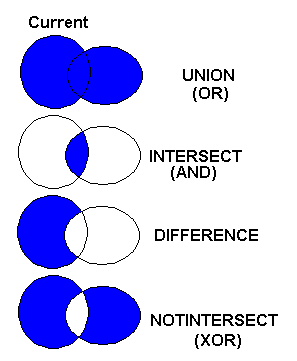
Changes the way regions are combined when created. Returns the previous status. Values: CD_UNION, CD_INTERSECT, CD_DIFFERENCE or CD_NOTINTERSECT. The value CD_QUERY simply returns the current status. Default value: CD_UNION. |
| pwa/p2js: | Not supported. |
| Comments: |
Combine Modes Complex Clipping Regions A complex region can composed of boxes, sectors, chords, polygons and texts. It is implemented only in the Windows GDI, Windows GDI+, GDK, Cairo(*), and X-Windows base drivers. Complex clipping regions can be created using cdCanvasBegin(CD_REGION)/(filled primtives)/.../cdCanvasEnd(). Between a cdCanvasBegin(CD_REGION) and a cdCanvasEnd(), all calls to cdBox, cdSector, cdChord, cdCanvasBegin(CD_FILL)/cdVertex(x,y)/.../cdCanvasEnd() and cdCanvasText() will be composed in a region for clipping. This is the only exception when you can call a cdCanvasBegin after another cdCanvasBegin. When you call cdCanvasBegin(CD_REGION) a new empty region will be created. So for the first operation you should use CD_UNION or CD_NOTINTERSECT combine modes. When you have finished composing the region call cdCanvasEnd(). To make the region active you must call cdClip(CD_CLIPREGION). For other clipping regions see Clipping. Although Cairo is capable of creating regions, you can not use them for clipping, just to use IsPointInRegion. And it can create only rectangle based regions, i.e. only cdBox will actually combine rectangles into the region. Complex clipping regions are not saved by cdSaveState. |
| Auxillary functions: |
bool res = cdCanvasIsPointInRegion(cdCanvas canvas, integer x, y)
-- or -- bool res = wdCanvasIsPointInRegion(cdCanvas canvas, atom x, y) Returns a non zero value if the point is contained inside the current region. cdCanvasOffsetRegion(cdCanvas canvas, integer dx, dy) -- or -- wdCanvasOffsetRegion(cdCanvas canvas, atom dx, dy) Moves the current region by the given offset. In X-Windows, if the region moves to outside the canvas border, the part moved outside will be lost, the region will need to be reconstructed. atom {xmin, xmax, ymin, ymax} = cdCanvasGetRegionBox(cdCanvas canvas) -- or -- atom {xmin, xmax, ymin, ymax} = wdCanvasGetRegionBox(cdCanvas canvas) Returns the rectangle of the bounding box of the current region. |