World Coordinates
| Description: |
Allows the use of a World Coordinate System. In this system you can attribute
coordinates to any unit you want. After you define a window (rectangular
region) in your world, each given coordinate is then mapped to canvas
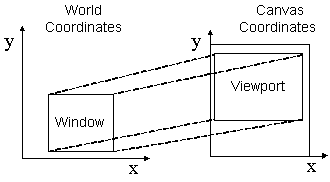
coordinates to draw the primitives. You can define a viewport in your canvas to
change the coordinate mapping from world to canvas. The image below shows the
relation between Window and Viewport.
Window x Viewport The quality of the picture depends on the conversion from World to Canvas, so if the canvas has a small size the picture quality will be poor. To increase picture quality create a canvas with a larger size, if possible. All World Coordinate drawing in all drivers are simulated using other CD primitives and do NOT depend or use cdCanvasTransform() transformation matrix. |
| pwa/p2js: | Not supported. |
| Auxillary functions: |
wdCanvasWindow(cdCanvas canvas, atom xmin, xmax, ymin, ymax)
Configures a window in the world coordinate system to be used to convert world coordinates (with values in real numbers) into canvas coordinates (with values in integers). The default window is the size in millimeters of the whole canvas. atom {xmin, xmax, ymin, ymax} = wdCanvasGetWindow(cdCanvas canvas) Queries the current window in the world coordinate system being used to convert world coordinates into canvas coordinates (and the other way round). wdCanvasViewport(cdCanvas canvas, atom xmin, xmax, ymin, ymax) Configures a viewport in the canvas coordinate system to be used to convert world coordinates (with values in real numbers) into canvas coordinates (with values in integers). The default viewport is the whole canvas (0,w-1,0,h-1). If the canvas size is changed, the viewport will not be automatically updated. atom {mode, xmin, xmax, ymin, ymax} = wdCanvasGetViewport(cdCanvas canvas) Queries the current viewport in the world coordinate system being used to convert world coordinates into canvas coordinates (and the other way round). integer {x, y} = wdCanvasWorld2Canvas(cdCanvas canvas, atom xw, yw) Converts world coordinates into canvas coordinates. integer {w, h} = wdCanvasWorld2CanvasSize(cdCanvas canvas, atom ww, hw) As wdCanvasWorld2Canvas(), but only applies the scale (sx,sy) and does not apply the transform (tx,ty) of wdCanvasSetTransform() and friends. (Unlike "", which applies both - PL: nb this is based on my interpretation of wd.c, not documented in cd.chm.) atom {xw, yw} = wdCanvasCanvas2World(cdCanvas canvas, atom xv, yv) Converts canvas coordinates into world coordinates. wdCanvasHardcopy(cdCanvas canvas, atom hCdContext, pData, cbFct) Creates a new canvas, prepares Window and Viewport according to the provided canvas, maintaining the aspect ratio and making the drawing occupy the largest possible area of the new canvas, calls the drawing function (cbFct, which must use routines in WC) and, finally, removes the new canvas. It is usually used for "hard copies" of drawings (print equivalent copy). The most common used contexts are Printer, PS and PDF. |