
IupMglPlot
| Definition: |
include pGUI.e
Ihandle ih = IupMglPlot(string attributes="", dword_seq args={}) |
| Description: |
Creates a plot of one or more data sets. It inherits from IupCanvas. Uses the MathGL library.
For more information on the attributes and args parameters see IupSetAttributes. MathGL is a library for creating plots that is system independent. It is maintained by Alexey Balakin and available at SourceForge http://mathgl.sourceforge.net/ with GPL and LGPL licenses. IupMglPlot library includes the MathGL 2.3.5 source code, so no external references are needed, but contains only the LGPL part of the library. |
| pwa/p2js: | Not supported, see IupGraph instead. |
| See Also: | IupCanvas, IupGraph, IupPlot |
| Notes: |
Initialization and UsageThe IupMglPlotOpen() function must be called after a IupOpen, so that the control can be used, however this is done automatically by IupMglPlot.GuideEach plot can contain 2 or 3 axes (X and Y and/or Z), a title, a legend box, a colorbar, a grid, a dataset area and as many datasets you want.Each dataset is added using the Auxiliary Functions. All other plot parameters are configured by attributes. If no attribute is set, the default values were selected to best display the plot. IMPORTANT: When setting attributes the plot is NOT redrawn until the REDRAW attribute is set or a redraw event occurs. The dataset area is delimited by the min/max axis attributes. Data is only plotted inside the dataset area. This area defines the 2D or 3D plot coordinate space. The screen area is a 2D pixels coordinate space. And finally the dataset also defines a normalized space, that means min/max is converted to 0-1. The legend box is a list of the dataset names, each one drawn with the same color of the correspondent dataset. The box is located in one of the four corners of the dataset area. The colorbar is an additional axis showing the the colors used to pseudo color the data for some plot modes. The grid is automatically spaced accordingly the current axis displayed values. The title is always centered in the top of the plot. The axes are positioned at the origin (0,0,0), but can be automatically positioned at the left-bottom. If values are only positive then the origin will be placed in left bottom position. If values are negative and positive then origin will be placed inside the plot. The ticks in the axis are also automatically distributed. DataMathGL supports several kinds of data. IupMglPlot restricts this to a few combinations. First there are 3 major classes:Linear sequential data are simply a sequence of points whether in 1D ([y1],[y2],...), 2D ([x1,y1],[x2,y2],...) or 3D ([x1,y1,z1],[x2,y2,z2],...) coordinates. Planar data is a bi-dimensional array of values, just like a digital image. Each value is f(x,y), where x belongs to [AXS_XMIN, AXS_XMAX] and y to [AXS_YMIN, AXS_YMAX]. Volumetric data is a tri-dimensional array of values, that represents a 3D volume. Each value is f(x,y,z), where x belongs to [AXS_XMIN, AXS_XMAX] and y to [AXS_YMIN, AXS_YMAX] and z to [AXS_ZMIN, AXS_ZMAX]. Linear data is the same representation accepted by IupPlot, with the addition that IupMglPlot has support for 3D coordinates. When plotting linear 1D data the automatic range will be XMIN=0 and XMAX=count-1. Planar and volumetric data can be very memory consuming, so be careful when using them. Planar and volumetric data in IupMglPlot have x, y and z coordinates equidistantly distributed. Planar and volumetric data are stored in a 1D dataset created by IupMglPlotNewDataSet, and filled with IupMglPlotSetData, IupMglPlotLoadData or IupMglPlotSetFromFormula functions only. InteractionZoom and Pan operations can be done using keyboard or mouse actions in 2D and 3D plots.Zoom can be done using the mouse wheel (Zoom in: scroll down; Zoom out: scroll up), the Ctrl+Left mouse button pressed and vertical mouse movements (Zoom in: bottom-up; Zoom out: top-down) or the plus '+' (Zoom in) and minus '−' (Zoom out) keys. Pan is done using horizontal and vertical mouse movements with the left mouse button pressed. By keyboard, the Ctrl+arrow keys combinations can be used to shift the window. Arrow keys can also be used without using the Ctrl key to slower movements. Rotation operations can also be done using keyboard or mouse actions, but only for 3D plots. Rotation in X axis: right mouse button pressed and vertical mouse movements, or 'w' and 's' keys. Rotation in Y axis: right mouse button pressed and horizontal mouse movements, or 'a' and 'd' keys. Rotation in Z axis: Ctrl+right mouse button pressed and vertical mouse movements, or 'e' and 'q' keys. Reseting: The interaction can be reset with a mouse double-click inside the plot area or by pressing the HOME key. This action restores the plot to the default view (no zoom, no pan and no rotation). Text and FontsMathGL provides support for parsing LaTeX-like syntax.So all labels and title can contain formatting commands and equation symbols. For example: \b (bold), \i (italic), \u (underline), \big (bigger size), @ (smaller size), ^ (upper), _ (lower), etc. The full list contain approximately 2000 commands. Multiline text is accepted. For example: "It can be \\wire{wire}, \\big{big} or #r{colored}" "One can change style in string: " "\\b{bold}, \\i{italic, \\b{both}}" "Easy to \\a{overline} or \\u{underline}" "Easy to change indexes ^{up} _{down} @{center}" "It parse TeX: \\int \\alpha \\cdot \\sqrt3{sin(\\pi x)^2 + \\gamma_{i_k}} dx" "\\sqrt{\\frac{\\alpha^{\\gamma^2}+" "\\overset 1{\\big\\infty}}{\\sqrt3{2+b}}}" 
The IupMglPlot function returns the identifier of the created plot, or NULL if an error occurs. |
| Auxiliary Functions: |
|
| Attributes: | |
| ALPHA | (non inheritable): Alpha value for overall transparency. Used only when TRANSPARENT=Yes. Default: 0.5 |
| ANTIALIAS |
(non inheritable): Enable or disable the anti-aliasing support when in OpenGL. Ignored when OPENGL=NO. Default: Yes. When enabled text has a much better rendering, but 3D graphs will not process depth properly. |
| BGCOLOR | the background color. Default: "255 255 255". |
| ERRORMESSAGE | (read-only, non inheritable): If not NULL returns the last error message reported by MathGL. |
| SUPPRESSWARNING | (write-only, non inheritable): Suppress de print of warning messages in stderr. Can be Yes or No. Default: No. (since 3.21) |
| FONT |
the default font used in all text elements of the plot: title, legend and labels. Font support is done using custom font files in MathGL font format (*.vfm). The font file must be located in the path pointed by the "IUP_MGLFONTS" environment variable, or in the path pointed by the "MGLFONTS" global attribute. The font name will be automatically combined with the path to compose a file name. If the font load fail, an internal MathGL font is used. Font loading is a very slow process in MathGL. TrueType (*.ttf) and OpenType (*.otf) font files support removed in version 3.11. All *FONTSTYLE attributes can have a combination of the following styles: Plain (Regular), Bold, Italic (Oblique), Wired, Underline, Strikeout, Left, Center and Right. All *FONTSIZE attributes are actually a factor that multiplies the size defined by the FONT attribute and an internal MathGL factor. So the actual size will be fontsize_factor * internal_factor * font_size. |
| FGCOLOR |
the default color used in all text elements of the plot: title, legend and labels. Default: "0 0 0 255".
All color values can have an optional alpha value. Hexadecimal format is also accepted. |
| MARGINLEFT, MARGINRIGHT, MARGINTOP, MARGINBOTTOM | (non inheritable): internal MathGL margin configuration of the dataset area. Can be Yes or No. Default: "Yes". (since 3.11) |
| MGLGRAPH | (read-only, non inheritable): returns the mglGraph* handle used internally. (since 3.11) |
| OPENGL |
(non inheritable): Enable or disable the rendering in OpenGL. Default: No. When NO the rendering is slower, but when Yes some features does not behave as expected. See Known Issues. |
| REDRAW |
(write-only, non inheritable): redraw the plot and update the display. Value is ignored. All other attributes will NOT update the display, so you can set many attributes without visual output. If the element is redraw by the system because of a redraw event or by a call to IupUpdate, it will have the same effect as if REDRAW was set. |
| RESET | (write-only, non inheritable): restores all attributes to their default values. Value is ignored. |
| TRANSPARENT | (non inheritable): Enable or disable the transparency support. Default: No. |
| Interaction: | (non inheritable) |
| ROTATE |
(non inheritable): define the angles of the axis rotation in degrees for 3D plots. The format is "angleX:angleY:angleZ". As example, the "0.0:90:0.0" rotates the Y-axis plot in 90 degrees. Partial values are also accepted, like "60::−45" or "::30" or "120". Default: 0:0:0. |
| ZOOM |
(non inheritable): define the zoom to 2D and 3D plots. The format is "x1:y1:x2:y2" in normalized coordinates, limited to the interval [0-1]. As example, the "0:0:1:1" set a plot to default view (centered in the drawing area). Partial values are also accepted, like "0.2:0.2" or ":0.3::1.3" or "-0.4". If values are set only to x1 and/or x2 coordinates, the zoom is restricted to the X axis. On the other hand, if values are set only to y1 and/or y2 coordinates, the zoom is restricted to the Y axis. Default: 0:0:1:1 |
| Title Configuration: | (non inheritable) |
| TITLE | (non inheritable): the title. Located always at the top center area. |
| TITLECOLOR | title color. Default: FGCOLOR. |
| TITLEFONTSIZE | title font size factor. Default: 1.0. The internal MathGL factor is 2.0. |
| TITLEFONTSTYLE | title font style. |
| Legend Configuration: | (non inheritable) |
| LEGEND | shows or hides the legend box. Can be YES or NO. Default: NO. LEGENDSHOW is also accepted. |
| LEGENDBOX | draws a box around the legend area. Default: YES. |
| LEGENDCOLOR | title color. Default: FGCOLOR. |
| LEGENDFONTSIZE | legend font size factor. Default: 1.0. The internal MathGL factor is 0.8. |
| LEGENDFONTSTYLE | legend font style. |
| LEGENDPOS |
legend box position. Can be: "TOPLEFT", |
| Colorbar Configuration: | (non inheritable) |
| COLORBAR | shows or hides the colorbar. Can be YES or NO. Default: NO. |
| COLORBARPOS |
colorbar position. Can be: "LEFT", |
| COLORBARRANGE |
interval of data values used for pseudo coloring in some plot modes. Must be "min:max" ("%g:%g" in C). Default from AXS_?MIN to AXS_?MAX according to COLORBARAXISTICKS. |
| COLORBARAXISTICKS | axis used as reference for colorbar ticks. Default: Z |
| Grid Configuration: | (non inheritable) |
| GRID |
shows or hides the grid in both or a specific axis. Can be: XYZ (YES), X, Y, Z, XY, XZ, YZ or NO. Default: NO. The values HORIZONTAL (Y) and X (VERTICAL) are accepted for IupPlot compatibility. |
| GRIDCOLOR | grid color. Default: "200 200 200". |
| GRIDLINESTYLE |
line style of the grid. Can be: "CONTINUOUS", |
| Box Configuration: | (non inheritable) |
| BOX | draws a bounding box around the dataset area. Default: NO. |
| BOXTICKS | if BOX=Yes then major ticks are also drawn along the box. Default: YES. |
| BOXCOLOR | box color. Default: FGCOLOR. |
| Dataset List Management: | (non inheritable) |
| CLEAR | (write-only): removes all datasets. Value is ignored. |
| COUNT | (read-only): total number of datasets. |
| CURRENT |
current dataset index. Default is -1. When a dataset is added it becomes the current dataset. The index starts at 0. All "DS_*" attributes are dependent on this value. |
| REMOVE | (write-only): removes a dataset given its index. |
| Dataset Configuration: | (non inheritable) |
| DS_COLOR |
color of the current dataset and it legend text. Default is dynamically generated for the 6 first datasets, others are default to black "0 0 0". The first 6 are: 0="255 0 0", 1="0 0 255", 2="0 255 0", 3="0 255 255", 4="255 0 255", 5="255 255 0". |
| DS_COUNT |
(read-only): returns the number of samples of the current dataset. For planar or volumetric datasets returns count_x * count_y * count_z. |
| DS_DIMENSION |
(read-only): returns the number of dimensions of the data: 1, 2 or 3. For planar and volumetric datasets returns the actual size of each dimension " |
| DS_LEGEND |
legend text of the current dataset. Default is dynamically generated: "plot 0", |
| DS_LINESTYLE |
line style of the current dataset. Can be: "CONTINUOUS" |
| DS_LINEWIDTH | line width of the current dataset. Default: 1. Can be 1 to 9 (since 3.11). |
| DS_MARKSTYLE |
mark style of the current dataset. Can be: "PLUS", |
| DS_MARKSIZE | mark size of the current dataset in normalized coordinates. Default: 1.0. |
| DS_MODE |
drawing mode of the current dataset. Default: "LINE".
Can be: LINE, BAR, MARK, MARKLINE, RADAR, AREA, BARHORIZONTAL, CHART, STEP or STEM for linear datasets. Can be: PLANAR_MESH, PLANAR_FALL, PLANAR_BELT, PLANAR_SURFACE, PLANAR_BOXES, PLANAR_TILE, PLANAR_DENSITY, PLANAR_CONTOUR, PLANAR_AXIALCONTOUR or PLANAR_GRADIENTLINES for planar datasets. Can be: VOLUME_ISOSURFACE, VOLUME_DENSITY, VOLUME_CONTOUR or VOLUME_CLOUD for volumetric datasets. Each of these modes can have secondary attributes, that can be configured only for the plot, and not for a specific dataset. See more at DS_MODE Options. |
| DS_REARRANGE |
(write-only): rearrange planar data into linear data. Value is ignored. It can rearrange planar data with count_y=2 or count_y=3, into 2D or 3D linear data accordingly. It can also rearrange planar data with count_y!=1 and count_x=2 or count_x=3 into 2D or 3D linear data accordingly. |
| DS_SPLIT |
(write-only): rearrange planar data into linear data, but spliting into different datasets. It can rearrange planar data with count_y=2 or count_y=3, into 2 or 3 datasets of 1D linear data accordingly. The current dataset is modified and 1 or 2 new datasets are created accordingly. |
| DS_SHOWVALUES |
enable or disable the display of the values near each sample. Can be YES or NO. Default: NO. Values are drawn with LEGENDFONTSIZE and LEGENDFONTSTYLE. |
| DS_REMOVE |
(write-only): removes a sample from the current dataset given its index. It can specify a range of samples using "index:count" (%d:%d). Ignored for planar and volumetric datasets. |
| Axis Configuration: | (non inheritable) (for X, Y and Z) |
| AXS_? | enable or disable the axis display. Can be YES or NO. Default: YES. |
| AXS_?AUTOMIN, AXS_?AUTOMAX | configures the automatic scaling of the minimum and maximum display values. Can be YES or NO. Default: YES. |
| AXS_?ARROW | enable or disable the axis arrow display. Can be YES or NO. Default: YES. |
| AXS_?COLOR | ticks values and label color. Default: "0 0 0". |
| AXS_?CROSSORIGIN |
same as setting AXS_?ORIGIN to 0 or NULL. Can be YES or NO. Default: NO. Returns YES if AXS_?ORIGIN is 0 and returns NO if AXS_?ORIGIN in NULL. Available for compatibility with IupPlot, but the default is different. |
| AXS_?FONTSIZE | axis label font size factor. Default: 0.8. The internal MathGL factor is 1.4. |
| AXS_?FONTSTYLE | axis label font style. |
| AXS_?LABEL | text label of the respective axis. |
| AXS_?LABELCENTERED |
text label position at center (YES) or at top/right (NO). Default: YES. Will set/get AXS_?LABELPOSITION to CENTER or MAX. Available for compatibility with IupPlot. |
| AXS_?LABELPOSITION | text label position. Can be CENTER, MAX or MIN. Default: CENTER. |
| AXS_?LABELROTATION |
enable or disable the text label rotation along the 3D axis. Can be YES or NO. Default: Yes. This means that text will be aligned with the axis even when rotating the graph. When NO text will be horizontal, always facing the camera, independently from graph rotation. For 2D graphs is useful to the Y axis only. |
| AXS_?MAX, AXS_?MIN |
minimum and maximum displayed values of the respective axis in plot coordinates. Automatically calculated values when AUTOMIN or AUTOMAX are enabled. Default: 1.0 and -1.0. When set will set the correspondent AUTOMIN or AUTOMAX to NO (since 3.11). |
| AXS_?ORIGIN |
position the origin of the axis in plot coordinates (%g). But if set to NULL will automatically position the origin at the bottom-left corner of the dataset area. Default: not defined. |
| AXS_?REVERSE |
reverse the axis direction. Can be YES or NO. Default: NO. Default is Y oriented bottom to top, and X oriented from left to right. |
| AXS_?SCALE |
configures the scale of the respective axis. Can be: LIN (linear) or LOG10 (decimal logarithm base 10). Default: LIN. |
| Axis Ticks Configuration: | (non inheritable) (for X, Y and Z) |
| AXS_?TICK | enable or disable the axis tick display. Can be YES or NO. Default: YES. |
| AXS_?TICKAUTO | configures the automatic tick spacing. Can be YES or NO. Default: YES. AXS_?AUTOTICK is also accepted. |
| AXS_?TICKAUTOSIZE | configures the automatic tick size. Can be YES or NO. Default: YES. AXS_?AUTOTICKSIZE is also accepted. |
| AXS_?TICKFONTSIZE | axis tick number font size factor. Default: 0.8. The internal MathGL factor is 1.0. |
| AXS_?TICKFONTSTYLE | axis tick number font style. |
| AXS_?TICKFORMAT | axis tick number C format string. Default: is internally computed according to the Min-Max range. |
| AXS_?TICKMAJORSIZE | axis major ticks size in normalized coordinates. Default is 0.1. Used only when TICKAUTOSIZE is disabled. |
| AXS_?TICKMAJORSPAN | spacing between major ticks in plot coordinates if positive, or number of major ticks along the axis range if negative. Default is -5 when TICKAUTO is disabled. |
| AXS_?TICKMINORDIVISION | number of minor ticks intervals between each major tick. Default is 5 when TICKAUTO is disabled. AXS_?TICKDIVISION is also accepted. |
| AXS_?TICKMINORSIZE | axis minor ticks size factor. It is a multiple of the AXS_?TICKMAJORSIZE. Default is 0.6. Used only when AUTOTICKSIZE is disabled. AXS_?TICKSIZE is also accepted. |
| AXS_?TICKVALUES | enable or disable the axis tick values display. Can be YES or NO. Default: YES. |
| AXS_?TICKVALUESROTATION |
enable or disable the axis tick values rotation along the 3D axis. Can be YES or NO. Default: YES (NO for Y axis). This means that text will be aligned with the axis even when rotating the graph. When NO text will be horizontal, always facing the camera, independently from graph rotation. For 2D graphs is useful to the Y axis only. |
| also | ACTIVE, SCREENPOSITION, POSITION, MINSIZE, MAXSIZE, WID, TIP, SIZE, RASTERSIZE, ZORDER, VISIBLE: also accepted. |
| Callbacks: | |
| PREDRAW_CB, POSTDRAW_CB |
Actions generated before and after the redraw operation. They can be used to draw additional information in the plot. Use only the IupMglPlotDraw* functions. For display output OpenGL primitives can also be used. function pre/postdraw_cb(Ihandle ih) ih: identifier of the element that activated the event. |
| also | MAP_CB, UNMAP_CB, DESTROY_CB, GETFOCUS_CB, KILLFOCUS_CB, ENTERWINDOW_CB, LEAVEWINDOW_CB, K_ANY, HELP_CB: All common callbacks are supported. |
| Examples | See demo\pGUI\mathglsamples.exw - the images below are all from that program. |
| DS_MODES Options |
For Linear Datasets |
| LINE |
Draws lines between points. DS_COLOR, DS_LINESTYLE and DS_LINEWIDTH are used
to configure the lines.

(3 plots) BOX=Yes 
ROTATE=40:0:60 BOX=Yes |
| MARK | Draws a mark in each point. DS_COLOR, DS_MARKSTYLE and DS_MARKSIZE are used to configure the marks. |
| MARKLINE | Draws lines between points and draws a mark in each point. Same as if LINE and MARK where set together. |
| RADAR |
Draws a radar chart. Like a LINE plot in polar coordinates. RADARSHIFT
configures an additional radial shift of the data [If rs<0 then rs=max(0,
-min(a))], default=-1. If DATAGRID=Yes then a grid of radial lines and a circle
for rs are drawn. DS_COLOR, DS_LINESTYLE and DS_LINEWIDTH are used to configure the lines.
DS_COLOR, DS_MARKSTYLE and DS_MARKSIZE are used to configure the marks.

(3 plots) RADARSHIFT=0.4 DATAGRID=Yes BOX=Yes |
| AREA |
Draws lines between points and fills it to axis plane. DS_COLOR is used to
configure fill color. The order of the datasets will define which one will be
drawn first.

(3 plots) AXS_XORIGIN=0 AXS_YORIGIN=0 BOX=Yes |
| BAR |
Draws vertical bars from points to axis plane. If DATAGRID=Yes then grid
lines are drawn, default=No. BARWIDTH sets relative width of rectangles,
default=0.7.

AXS_XORIGIN=0 AXS_YORIGIN=0 BOX=Yes 
ROTATE=40:0:60 BOX=Yes |
| BARHORIZONTAL |
Draws horizontal bars from points to axis plane. If DATAGRID=Yes then grid
lines are drawn, default=No. BARWIDTH sets relative width of rectangles,
default=0.7.

AXS_XORIGIN=0 AXS_YORIGIN=0 BOX=Yes |
| CHART |
Draws colored stripes (boxes). If DATAGRID=Yes then black border lines are
drawn, default=No. If PIECHART=Yes cylindrical coordinates are used, default=No.

DATAGRID=Yes BOX=Yes 
DATAGRID=Yes BOX=Yes PIECHART=Yes COLORSCHEME=bgr cmy |
| STEP |
Draws continuous stairs for points to axis plane. DS_COLOR, DS_LINESTYLE and DS_LINEWIDTH are used to configure the lines. DS_COLOR, DS_MARKSTYLE and DS_MARKSIZE are used to configure the marks. 
(3 plots) BOX=Yes |
| STEM |
Draws vertical lines from points to axis plane. DS_COLOR, DS_LINESTYLE and DS_LINEWIDTH are used to configure the lines. DS_COLOR, DS_MARKSTYLE and DS_MARKSIZE are used to configure the marks. 
(3 plots) DS_MARKSTYLE=HOLLOW_CIRCLE DS_SHOWMARKS=Yes AXS_XORIGIN=0 AXS_YORIGIN=0 BOX=Yes |
| DOTS |
Draws arbitrary placed points. Colors will be used from the previous color
scheme or from COLORSCHEME if defined.

ROTATE=40:0:60 BOX=Yes TRANSPARENT=No LIGHT=Yes |
| CRUST |
This will reconstruct and draw the surface for arbitrary placed points.
If DATAGRID=Yes then wire plot is produced, default=No. Colors will
be used from the previous color scheme or from COLORSCHEME if defined.

ROTATE=40:0:60 BOX=Yes |
For Planar DatasetsFor all planar modes colors will be used from the previous color scheme or from COLORSCHEME if defined. COLORSCHEME is a string that can specify a group of colors to be used by the plot.Colors in a color scheme are specified by the codes "wkrgbcymhRGBCYMHWlenupqLENUPQ" only. A brightness weight from 1 to 9 can also be used to change the default value from 5 normal, to 1 very dark, and to 9 very bright. Also the symbol 'd' denotes the interpolation by 3D position instead of the coloring by amplitude. Symbol '|' disables color interpolation in color scheme, which can be useful, for example, for sharp colors during matrix plotting. For coloring by amplitude (most common) the final color is a linear interpolation of color array. The color array is constructed from the string ids. The argument is the amplitude normalized based on COLORBARRANGE. When coloring by coordinate, the final color is determined by the position of the point in 3D space and is calculated from combining the first three elements of color array with the x, y and z normalizes values. This type of coloring is useful for isosurface plot where color may show the exact position of a piece of surface. Here are some examples or color codes and color schemes: 

|
|
| PLANAR_MESH |
Draws mesh lines for the surface. Mesh lines are plotted for each z slice of
the data. DS_LINESTYLE and DS_LINEWIDTH are used to configure the lines.

ROTATE=40:0:60 BOX=Yes TRANSPARENT=No LIGHT=Yes |
| PLANAR_FALL |
Draws fall lines for the surface. DS_LINESTYLE and DS_LINEWIDTH are used to configure the lines.
If DIR=X, then lines are drawn along x-direction else lines are drawn along
y-direction, default=Y.
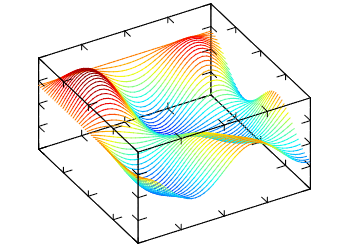
ROTATE=40:0:60 BOX=Yes TRANSPARENT=No LIGHT=Yes |
| PLANAR_BELT |
Draws belts for the surface. If DIR=X, then lines are drawn along x-direction
else lines are drawn along y-direction, default=Y.

ROTATE=40:0:60 BOX=Yes TRANSPARENT=No LIGHT=Yes |
| PLANAR_SURFACE |
Draws the surface. If DATAGRID=Yes then grid lines are drawn, default=No.

ROTATE=40:0:60 BOX=Yes TRANSPARENT=No LIGHT=Yes 
ROTATE=40:0:60 BOX=Yes TRANSPARENT=No LIGHT=Yes COLORSCHEME=BbcyrR| |
| PLANAR_BOXES |
Draws vertical boxes for the surface. If DATAGRID=Yes then box lines are
drawn, default=No.

ROTATE=40:0:60 BOX=Yes TRANSPARENT=No LIGHT=Yes AXS_XORIGIN=0 AXS_YORIGIN=0 AXS_ZORIGIN=0 |
| PLANAR_TILE |
Draws horizontal tiles for the surface, it can be seen as 3D generalization
of STEP.

ROTATE=40:0:60 BOX=Yes TRANSPARENT=No LIGHT=Yes |
| PLANAR_DENSITY |
Draws density plot for the surface at minimum z coordinate.

BOX=Yes TRANSPARENT=No COLORBAR=Yes |
| PLANAR_CONTOUR |
Draws contour lines for the surface at the minimum z coordinate. CONTOURCOUNT defines
the number of contour lines, default=7. If CONTOURFILLED=Yes
draws solid (or filled) contour lines for the surface, default=No. If CONTOURLABELS
is defined then contour labels will be drawn BELLOW or ABOVE the contours.

ROTATE=40:0:60 BOX=Yes TRANSPARENT=No LIGHT=Yes CONTOURLABELS=BELLOW 
ROTATE=40:0:60 BOX=Yes TRANSPARENT=No LIGHT=Yes CONTOURFILLED=Yes 
ROTATE=40:0:60 BOX=Yes TRANSPARENT=No LIGHT=Yes (dual plot) DS_MODE=PLANAR_SURFACE DS_MODE=PLANAR_CONTOUR |
| PLANAR_AXIALCONTOUR |
Draws a surface which is result of the contour plot rotation for the surface.
AXIALCOUNT defines the number of elements distributed in the COLORBARRANGE
interval, default=3.

ROTATE=40:0:60 BOX=Yes TRANSPARENT=Yes LIGHT=Yes |
| PLANAR_GRADIENTLINES |
Draws gradient lines for scalar field defined by the surface at minimum z
coordinate. Number of lines is proportional to GRADLINESCOUNT, default=5 . If
GRADLINESCOUNT<0 then lines start from borders only. Lines are plotted for each
z slice of the data.

BOX=Yes TRANSPARENT=Yes LIGHT=Yes 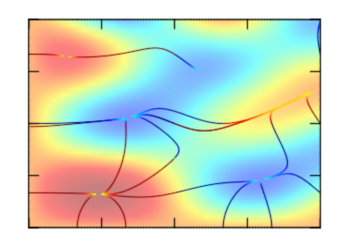
BOX=Yes TRANSPARENT=Yes LIGHT=Yes (dual plot) DS_MODE=PLANAR_GRADIENTLINES DS_MODE=PLANAR_DENSITY |
For Volumetric DatasetsFor all volumetric modes colors will be used from the previous color scheme or from COLORSCHEME if defined. |
|
| VOLUME_ISOSURFACE |
Draws isosurface plot for the volume. If DATAGRID=Yes then wire plot is
produced, default=No. if ISOVALUE is defined only 1 isosurface is plot, else
ISOCOUNT (default=3) surfaces are plot distributed in the COLORBARRANGE
interval.
Note, that there is possibility of incorrect plotting due to uncertainty of cross-section defining if there are two or more isosurface intersections inside one cell. 
ROTATE=40:0:60 BOX=Yes TRANSPARENT=Yes LIGHT=Yes |
| VOLUME_DENSITY |
Draws density plot for the volume. If DATAGRID=Yes then grid lines are drawn,
default=No. If PROJECT=Yes draws density plot in x, y, or z plain, default=No.
When PROJECT=Yes, PROJECTVALUEX, PROJECTVALUEY and PROJECTVALUEZ, are used to
select data at the given coordinate, if they are not defined AXS_?ORIGIN is used
accordingly. When PROJECT=No, SLICEX, SLICEY and SLICEZ, are used to define the
slice where the plot is done, default is -1 (central). SLICEDIR defines which
directions are used, default "XYZ".

ROTATE=40:0:60 BOX=Yes TRANSPARENT=Yes LIGHT=No AXS_XORIGIN=0 AXS_YORIGIN=0 AXS_ZORIGIN=0 AXS_X=Yes AXS_Y=Yes AXS_Z=Yes 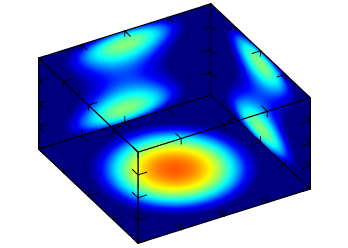
ROTATE=40:0:60 BOX=Yes TRANSPARENT=No LIGHT=No PROJECT=Yes PROJECTVALUEX=-1 PROJECTVALUEY=1 PROJECTVALUEZ=-1 |
| VOLUME_CONTOUR |
Draws contour plot for the volume. If DATAGRID=Yes then grid lines are drawn,
default=No. If PROJECT=Yes draws contour plot in x, y, or z plain, default=No.
When PROJECT=Yes, PROJECTVALUEX, PROJECTVALUEY and PROJECTVALUEZ, are used to
select data at the given coordinate, if they are not defined AXS_?ORIGIN is used
accordingly. When PROJECT=No, SLICEX, SLICEY and SLICEZ, are used to define the
slice where the plot is done, default is -1 (central). SLICEDIR defines which
directions are used, default "XYZ". If CONTOURFILLED=Yes draws solid (or filled)
contour lines for the surface, default=No. CONTOURCOUNT defines the number of
contour lines, default=7. Where lines are used, DS_LINESTYLE and DS_LINEWIDTH are used to configure the lines.

ROTATE=40:0:60 BOX=Yes TRANSPARENT=No LIGHT=Yes 
ROTATE=40:0:60 BOX=Yes TRANSPARENT=No LIGHT=Yes PROJECT=Yes PROJECTVALUEX=-1 PROJECTVALUEY=1 PROJECTVALUEZ=-1 
ROTATE=40:0:60 BOX=Yes TRANSPARENT=No LIGHT=Yes CONTOURFILLED=Yes 
ROTATE=40:0:60 BOX=Yes TRANSPARENT=No LIGHT=Yes PROJECT=Yes PROJECTVALUEX=-1 PROJECTVALUEY=1 PROJECTVALUEZ=-1 CONTOURFILLED=Yes |
| VOLUME_CLOUD |
Draws cloud plot for the volume. This plot is a set of cubes with color and
transparency proportional to value of ALPHA. The resulting plot is like cloud -
low value is transparent but higher ones are not. If CLOUDLOW=Yes then lower
quality plot will be produced with much low memory usage.
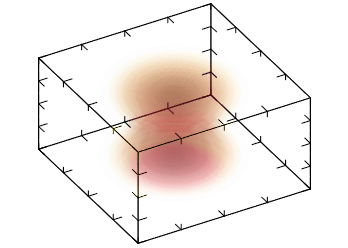
ROTATE=40:0:60 BOX=Yes TRANSPARENT=Yes LIGHT=No COLORSCHEME=wyrRk |
| Differences from IupPlot |
Uses OpenGL for screen output and internal drivers for metafile output. IupPlot uses CD for screen and metafile output.
Selection and editing of a dataset using the DS_EDIT attribute are not implemented. All functions use double floating point. (since 3.11) New support for 3D data and 3D plots. New support for planar and volumetric data. New ALPHA, ANTIALIAS, DS_DIMENSION, LEGENDBOX, BOX, BOXTICKS, BOXCOLOR, AXS_*ORIGIN, AXS_?LABELPOSITION, AXS_?LABELROTATION, AXS_?TICKVALUESROTATION, LEGENDCOLOR, TITLECOLOR, LIGHT, COLORBAR*, COLORSCHEME attributes. Many new DS_MODE options. USE_IMAGERGB and USE_GDI+ attributes are NOT supported. MARGIN* attributes are NOT supported. AXS_?SCALE attribute does NOT support the LOG2 and LOGN values. The Crosshair cursor is not supported. The PREDRAW_CB, POSTDRAW_CB callbacks does not includes the CD canvas parameter. *FONTSIZE attributes are a multiple factor of the FONT size. DASH_DOT_DOT line style is not supported, but has new line styles: LONGDASHED, SMALLDASHED and SMALLDASH_DOT. AXS_?TICKMAJORSIZE, MARKSIZE are in normalized coordinates. New options for GRID: Z, XYZ, XZ, YZ. AXS_?TICKSIZE renamed to AXS_?TICKMINORSIZE, and is a factor of the AXS_?TICKMAJORSIZE. AXS_?TICKMAJORSPAN default value is -5. AXS_?TICKFORMAT default is internally computed according to the Min-Max range. |
| Function Mapping: |
IupPlotBegin -> IupMglPlotBegin (IMPORTANT: parameter is the dimension 1, 2 or 3) IupPlotAddStr -> IupMglPlotAdd1D IupPlotAdd -> IupMglPlotAdd2D (none) IupMglPlotAdd3D IupPlotEnd -> IupMglPlotEnd (none) IupMglPlotNewDataSet IupPlotInsertStr (not mapped, use IupMglPlotInsert1D) IupPlotInsert (not mapped, use IupMglPlotInsert2D) IupPlotInsertStrPoints -> IupMglPlotInsert1D (names array is optional) IupPlotInsertPoints -> IupMglPlotInsert2D (none) IupMglPlotInsert3D IupPlotAddStrPoints -> IupMglPlotInsert1D (insert at DS_COUNT) IupPlotAddPoints -> IupMglPlotInsert2D (insert at DS_COUNT) (none) IupMglPlotInsert3D (none) IupMglPlotSet1D (none) IupMglPlotSet2D (none) IupMglPlotSet3D (none) IupMglPlotSetData (none) IupMglPlotLoadData (none) IupMglPlotSetFromFormula IupPlotTransform -> IupMglPlotTransform (includes z coordinate) (none) IupMglPlotTransformXYZ (cdCanvasMark) -> IupMglPlotDrawMark (cdCanvasLine) -> IupMglPlotDrawLine (cdCanvasText) -> IupMglPlotDrawText IupPlotPaintTo -> IupMglPlotPaintTo (parameters are different) |
| Known Issues/To Do |
Add UTF-8 mode using MathGL unicode support. Compile MathGL using OpenMP support. Text render quality is lower than in IupPlot. Logarithm scale is not working properly. Automatic ticks computation needs to be improved. Text rotation when DS_SHOWVALUES=Yes is not ok. (MathGL) When OPENGL=Yes initial size is smaller. (MathGL) There is still lots of MathGL features not available in IupMglPlot. |