
IupCells
| Definition: |
include pGUI.e
Ihandle ih = IupCells(string attributes="", dword_seq args={}) |
| Description: |
Creates a grid widget (set of cells) that enables several application-specific drawing, such as: chess tables, tiles editors, degrade scales, drawable spreadsheets and so forth.
This element is mostly based on application callbacks that determine the number of cells (rows and columns), their appearance and interaction. This mechanism offers full flexibility to applications, but requires careful attention to avoid infinite loops inside these functions. Using callbacks, cells can be also grouped to form major or hierarchical elements, such as headers, footers etc. This callback approach was intentionally chosen to allow all cells to be dynamically and directly changed based on an application’s data structures. Since the size of each cell is given by the application, the size of the control also must be given using SIZE or RASTERSIZE attributes. This is an additional control that depends on the CD library. It is included in the IupControls library. [DEV no longer so in version 3.24 and later] It inherits from IupCanvas. Originally implemented by André Clinio. For more information on the attributes and args parameters see IupSetAttributes. Returns: the identifier of the created element. |
| pwa/p2js: | Not supportedx, see IupTable. |
| See Also: | IupCanvas |
| Utility Functions |
The utility functions IupSetAttributeId2, IupGetAttributeId2,
IupGetIntId2, IupGetFloatId2,
IupSetIntId2, and IupSetFloatId2
can also be used here. Note that the C function IupSetfAttributeId2 is not wrapped by pGUI, however that functionality is covered by the
optional parameters of IupSetStrAttributeId2.
For example: IupSetAttribute(ih, "30:10", value) => IupSetAttributeId2(ih, "", 30, 10, value) IupSetAttribute(ih, "BGCOLOR30:10", value) => IupSetAttributeId2(ih, "BGCOLOR", 30, 10, value) IupSetAttribute(ih, "ALIGNMENT10", value) => IupSetAttributeId(ih, "ALIGNMENT", 10, value) When one of the indices is the asterisk, use IUP_INVALID_ID as the parameter. For example: IupSetAttribute(ih, "BGCOLOR30:*", value) => IupSetAttributeId2(ih, "BGCOLOR", 30, IUP_INVALID_ID, value) These functions are faster than the traditional functions because they do not need to parse the attribute name string and the application does not need to concatenate the attribute name with the id. |
| Attributes: | |
| BOXED |
Determines if the bounding cells’ regions should be drawn with black lines. It can be "YES" or "NO". Default: "YES". If the span attributes are used, set this attribute to "NO" to avoid grid drawing over spanned cells. |
| BUFFERIZE |
Disables the automatic redrawing of the control, so many attributes can be changed without many redraws. When set to "NO" the control is redrawn. When REPAINT attribute is set, BUFFERIZE is automatically set to "NO". Default: "NO". |
| CANVAS |
(read-only, non inheritable) Returns the internal IUP CD canvas. This attribute should be used only in specific cases and by experienced CD programmers. |
| CLIPPED |
Determines if, before cells drawing, each bounding region should be clipped. This attribute should the changed in few specific cases. It can be "YES" or "NO". Default: "YES". |
| FIRST_COL | (read-only, non inheritable) Returns the number of the first visible column. |
| FIRST_LINE | (read-only, non inheritable) Returns the number of the first visible line. |
| FULL_VISIBLE |
(write-only, non inheritable) Tries to show completely a specific cell (considering any vertical or horizontal header or scrollbar position). This attribute is set by a formatted string "%d:%d" (C syntax), where each "%d" represent the line and column integer indexes respectively. |
| IMAGE_CANVAS |
(read-only, non inheritable) Returns the internal image CD canvas. This attribute should be used only in specific cases and by experienced CD programmers. |
| LIMITSL:C |
(read-only, non inheritable) Returns the limits of a given cell. Input format is "lin:col" or "%d:%d" in C. Output format is "xmin:xmax:ymin:ymax" or "%d:%d:%d:%d" in C. |
| NON_SCROLLABLE_LINES |
Determines the number of non-scrollable lines (vertical headers) that should always be visible despite the vertical scrollbar position. It can be any non-negative integer value. Default: "0" |
| NON_SCROLLABLE_COLS |
Determines the number of non-scrollable columns (horizontal headers) that should always be visible despite the horizontal scrollbar position. It can be any non-negative integer value. Default: "0" |
| ORIGIN |
Sets the first visible line and column positions. This attribute is set by a formatted string "%d:%d" (C syntax), where each "%d" represent the line and column integer indexes respectively. |
| REPAINT | (write-only, non inheritable) When set with any value, provokes the control to be redrawn. |
| SIZE | (non inheritable) there is no initial size. You must define SIZE or RASTERSIZE. |
| SCROLLBAR | (creation only) Default: "YES". |
| also | ACTIVE BGCOLOR FONT, NAME, SCREENPOSITION, POSITION, MINSIZE, MAXSIZE, WID, TIP, RASTERSIZE, ZORDER, VISIBLE: also accepted. |
| Callbacks: | |
| DRAW_CB |
called when a specific cell needs to be redrawn.
function draw_cb(Ihandle ih, integer line, column, xmin, xmax, ymin, ymax, cdCanvas canvas) ih: identifier of the element that activated the event. line, column: the grid position inside the control that is being redrawn, in grid coordinates. xmin, xmax, ymin, ymax: the raster bounding box of the redrawn cells, where the application can use CD functions to draw anything. If the attribute IUP_CLIPPED is set (the default), all CD graphical primitives is clipped to the bounding region. canvas: internal canvas CD used to draw the cells. |
| HEIGHT_CB |
called when the controls needs to know a (eventually new) line height.
function height_cb(Ihandle ih, integer line) ih: identifier of the element that activated the event. line: the line index Returns: an integer that specifies the desired height (in pixels). Default is 30 pixels. |
| HSPAN_CB |
called when the control needs to know if a cell should be horizontally spanned.
function hspan_cb(Ihandle ih, integer line, column) ih: identifier of the element that activated the event. line, column: the line and column indexes (in grid coordinates) Returns: an integer that specifies the desired span. Default is 1 (no span). |
| MOUSECLICK_CB |
called when a color is selected. The primary color is selected with the left mouse button, and if existent the secondary is selected with the right mouse button. function mouseclick_cb(Ihandle ih, integer button, pressed, line, column, x, y, atom pSstatus) Same as the BUTTON_CB IupCanvas callback with two additional parameters: line, column: the grid position in the control where the event has occurred, in grid coordinates. |
| MOUSEMOTION_CB |
called when the mouse moves over the control.
function mousemotion_cb(Ihandle ih, integer line, column, x, y, atom pStatus) Same as the MOTION_CB IupCanvas callback with two additional parameters: line, column: the grid position in the control where the event has occurred, in grid coordinates. |
| NCOLS_CB |
called when then controls needs to know its number of columns.
function ncols_cb(Ihandle ih) ih: identifier of the element that activated the event. Returns: an integer that specifies the number of columns. Default is 10 columns. |
| NLINES_CB |
called when then controls needs to know its number of lines.
function nlines_cb(Ihandle ih) ih: identifier of the element that activated the event. Returns: an integer that specifies the number of lines. Default is 10 lines. |
| SCROLLING_CB |
called when the scrollbars are activated.
function scrolling_cb(Ihandle ih, integer line, column) ih: identifier of the element that activated the event. line, column: the first visible line and column indexes (in grid coordinates) Returns: If IUP_IGNORE the cell is not redrawn. By default the cell is always redrawn. |
| VSPAN_CB |
called when the control needs to know if a cell should be vertically spanned.
function vspan_cb(Ihandle ih, integer line, column) ih: identifier of the element that activated the event. line, column: the line and column indexes (in grid coordinates) Returns: an integer that specifies the desired span. Default is 1 (no span). |
| WIDTH_CB |
called when the controls needs to know the column width
function width_cb(Ihandle ih, integer column) ih: identifier of the element that activated the event. column: the column index Returns: an integer that specifies the desired width (in pixels). Default is 60 pixels. |
| also | MAP_CB, UNMAP_CB, DESTROY_CB, GETFOCUS_CB, KILLFOCUS_CB, ENTERWINDOW_CB, LEAVEWINDOW_CB, K_ANY, HELP_CB: common callbacks are supported. |
| Example: |
Checkerboard Pattern 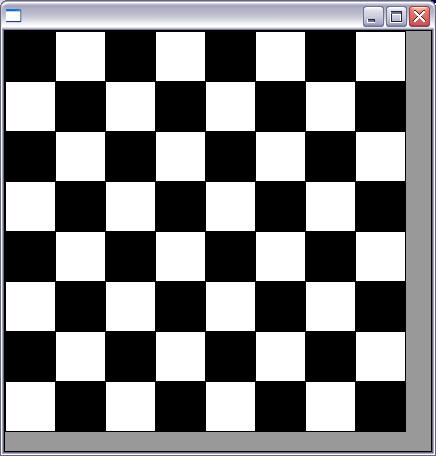
Numbering Cells 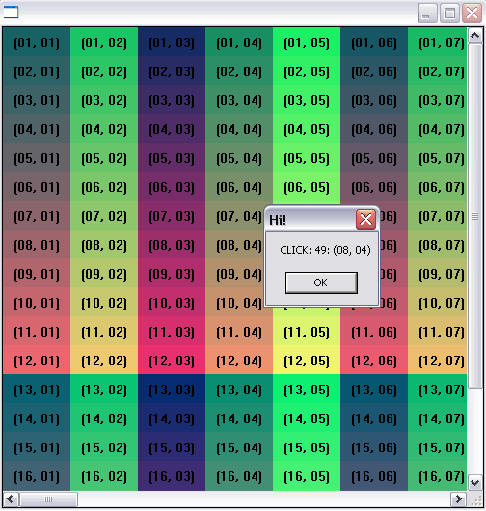
|