IupGauge
| Definition: |
include pGUI.e
Ihandle ih = IupGauge(string attributes="", dword_seq args={}) |
|
| Description: |
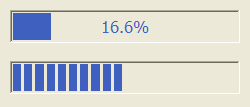
Creates a Gauge control. Shows a percent value that can be updated to simulate a progression. It inherits from IupCanvas. (Migrated from the IupControls library since IUP 3.24, it does not depend on the CD library anymore.) For more information on the attributes and args parameters see IupSetAttributes. Returns: the identifier of the created element. |
|
| pwa/p2js: | Not supported (just not yet attempted) | |
| See Also: | IupCanvas, IupProgressBar | |
| Notes: |
To replace an IupProgressBar by an IupGauge you should set RASTERSIZE=200x30 and SHOWTEXT=NO.
An example can be seen in demo\pGUI\IupFlatSample.exw |
|
| Attributes: | ||
| BACKCOLOR | (non inheritable): color of the background inside the borders. Predefined to "220 220 220". Can be NULL. When NULL it will use the parent’s background color. (since 3.28) | |
| CANFOCUS | enables the focus traversal of the control. Default: NO. (different from IupCanvas) | |
| DASHED | Changes the style of the gauge for a dashed pattern. Default is "NO". | |
| FGCOLOR | Controls the gauge and text color. Default: "0 120 220" (changed in 3.28). | |
| FLAT | use a 1 pixel flat border instead of the default 3 pixels sunken border. Can be Yes or No. Default: No. (since 3.21) | |
| FLATCOLOR | color of the border when FLAT=Yes. Default: "160 160 160". (since 3.21) | |
| MAX | (non inheritable) Contains the maximum value. Default is "1". | |
| MIN | (non inheritable) Contains the minimum value. Default is "0". | |
| ORIENTATION |
(creation only) can be "VERTICAL" or "HORIZONTAL". Default: "HORIZONTAL". Horizontal goes from left to right, and vertical from bottom to top. Width and height are swapped when orientation is set. (since 3.27) |
|
| PADDING | internal margin. Works just like the MARGIN attribute of the IupHbox and IupVbox containers, but uses a different name to avoid inheritance problems. Default value: "0x0". (since 3.0) | |
| CPADDING | same as PADDING but using the units of the SIZE attribute. It will actually set the PADDING attribute. (since 3.29) | |
| SHOWTEXT |
Indicates if the text inside the Gauge is to be shown or not. If the gauge is dashed the text is never shown. Possible values: "YES" or "NO". Default: "YES". |
|
| SIZE | (non inheritable): The initial size is "120x14". Set to NULL to allow the automatic layout use smaller values. | |
| TEXT |
(non inheritable): Contains a text to be shown inside the Gauge when SHOW_TEXT=YES. If it is NULL, the percentage calculated from VALUE will be used. If the gauge is dashed the text is never shown. When ORIENTATION=VERTICAL text is drawn in 9° |
|
| VALUE | (non inheritable) Contains a number between "MIN" and "MAX", controlling the current position. | |
| also | ACTIVE, BGCOLOR, EXPAND, FONT, SCREENPOSITION, POSITION, MINSIZE, MAXSIZE, WID, TIP, RASTERSIZE, THEME, ZORDER, VISIBLE: also accepted. | |
| Callbacks: | MAP_CB, UNMAP_CB, DESTROY_CB: common callbacks are supported. | |
The Two Types of Gauge
|