
IupColorDlg
| Definition: |
include pGUI.e
Ihandle ih = IupColorDlg() |
| Description: |
Creates the Color Dialog element. It is a predefined dialog for selecting a color.
(since IUP version 3.24 the native versions were removed and only the IupColorBrowser based dialog remains.) It is a regular IupDialog that can be shown as any regular IupDialog, with IupShow or IupPopup. Returns the identifier of the created element. |
| pwa/p2js: | Not supported |
| See Also: | IupGetColor |
| Attributes: | |
| ALPHA |
if defined it will enable an alpha selection additional controls with its initial value. If the user pressed the Ok button contains the returned value. Default: no defined, or 255 if SHOWALPHA=YES. |
| COLORTABLE |
list of colors separated by ";". In GTK and in the ColorBrowser based accepts 20 values and if not present the palette will not be visible. In Windows accepts 16 values and will be always visible, even if the colors are not defined (in this case are initialized with black). If a color is not specified then the default color is used. You can skip colors using ";;". |
| PARENTDIALOG |
(creation only) Name of a dialog to be used as parent. This dialog will be always in front of the parent dialog. |
| SHOWALPHA | if enabled will display the alpha selection controls, regardless if ALPHA is defined for the initial value or not. |
| SHOWCOLORTABLE |
if enabled will display the color table, regardless if COLORTABLE is defined or not. The default colors in the color table are different in GTK and in the ColorBrowser based dialog. In Windows the default colors are all black. |
| SHOWHEX | if enabled will display the Hexadecimal notation of the color. |
| SHOWHELP |
if enabled will display the Help button. In GTK and Windows, the Help button is shown only if the HELP_CB callback is defined. |
| STATUS | (read-only) defined to "1" if the user pressed the Ok button, NULL if pressed the Cancel button. |
| TITLE | Dialog title. |
| VALUE |
The color value in RGB coordinates and optionally alpha. It is used as the initial value and contains the selected value if the user pressed the Ok button. Format: "R G B" or "R G B A". Each component range from 0 to 255. |
| VALUEHSI |
The color value in HSI coordinates. It is used as the initial value and contains the selected value if the user pressed the Ok button. Format: "H S I". Each component range from 0-359, 0-100 and 0-100 respectively. |
| VALUEHEX |
The color value in RGB Hexadecimal notation. It is used as the initial value and contains the selected value if the user pressed the Ok button. Format: "#RRGGBB". Each component range from 0-255, but in hexadecimal notation. |
| Callbacks: | |
| COLORUPDATE_CB |
Action generated when the color is updated in the dialog. It is also called when the color is updated programmatically. (since 3.11) function colorupdate_cb(Ihandle ih) ih: identifier of the element that activated the event. |
| HELP_CB | Action generated when the Help button is pressed. |
| Example: |
include pGUI.e

function help_cb(Ihandle /*ih*/)
    ?"help_cb"
    return IUP_CONTINUE
end function

IupOpen(`demo\pGUI\`)
Ihandln dlg = IupColorDlg()

IupSetAttribute(dlg, "VALUE", "128 0 255");
IupSetAttribute(dlg, "ALPHA", "142");
IupSetAttribute(dlg, "SHOWHEX", "YES");
IupSetAttribute(dlg, "SHOWCOLORTABLE", "YES");
IupSetAttribute(dlg, "TITLE", "IupColorDlg Test");
IupSetCallback(dlg, "HELP_CB", Icallback("help_cb"));

IupPopup(dlg, IUP_CURRENT, IUP_CURRENT);

if IupGetInt(dlg, "STATUS") then
  printf(1, "OK\n VALUE(%s)\n COLORTABLE(%s)\n",
            {IupGetAttribute(dlg,"VALUE"),
             IupGetAttribute(dlg,"COLORTABLE")})
else
  printf(1,"CANCEL\n")
end if

dlg = IupDestroy(dlg)
Note that clipboard has an Ihandln type for the benefit of IupDestroy(); IupColorDlg() will throw a (catchable) exception rather than return NULL. 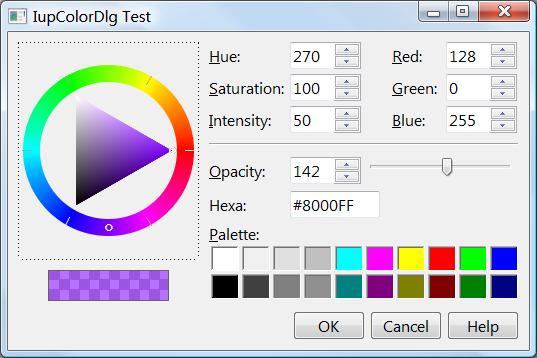
|
| See Also: | IupPopup, IupSetCallback, IupGetInt, IupDestroy |